90+4 Minutes of Horror
As the FC Bayern München already won the German Soccer league many weeks ago (and consequently dropped out of the remaining contests), no one was really interested in the Bundesliga any longer – no one?
Being boring at one end of the table does not mean that the other end is boring as well. And quite opposite to the top, the bottom of the table was extremely thrilling, with 6 teams that potentially could relegate before the last match day. Even more excitingly, all 6 teams were only spread over 4 games, meaning 4 of the teams were facing a direct opponent in the fight for staying in the Bundesliga.
Enough said, within the 90+4 Minutes of match time, we saw 11 goals and 6 of these goals affected the table ranking, i.e. who was to relegate or not:
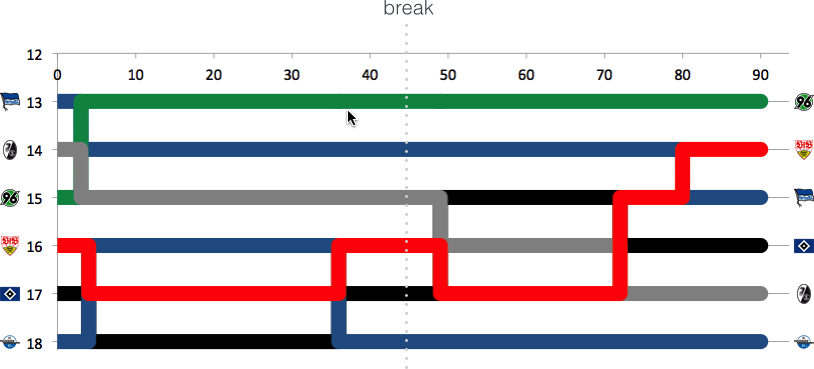
What do we learn from this visualization?
- Paderborn, starting the last match day as last and found itself at the very same place, is to relegate. The 32 minutes of hope from 0:04 to 0:36 did fade with Stuttgarts equalizer.
- HSV is one of the two rollercoaster teams, with a spread of 4 and 4 rank changes. Winning their game qualifies them to play against KSC of the 2nd Bundesliga, to see who is to play Bundesliga next season, as they climbed from 17th to 16th.
- The second rollercoaster team is the VfB, with a spread of 4 and even 5 rank changes. Spending most of the last match day (exactly 55 minutes) on a direct relegation rank, winning against Paderborn pushed them up to rank 14.
- Hannover did not take any chance and won against Hertha, climbing from 15 to 13
- Freiburg is the looser of the day. Starting as 14th, they found themselves 3 ranks down on 17th, directly relegating to 2nd Bundesliga.
- Hertha had only a very small chance to actually being endangered to relegate. Nonetheless, they slipped 2 ranks but as 15th, they are to stay in the Bundesliga.
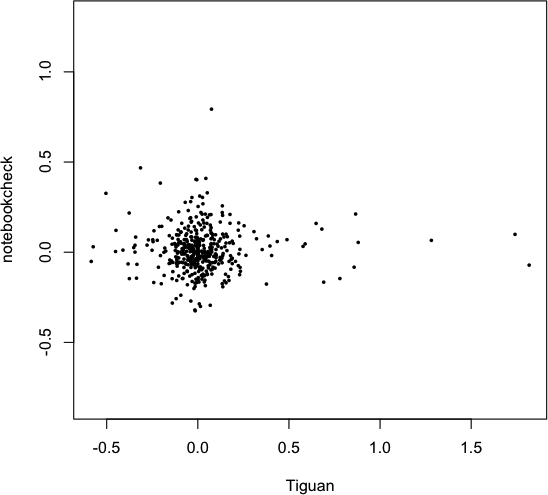
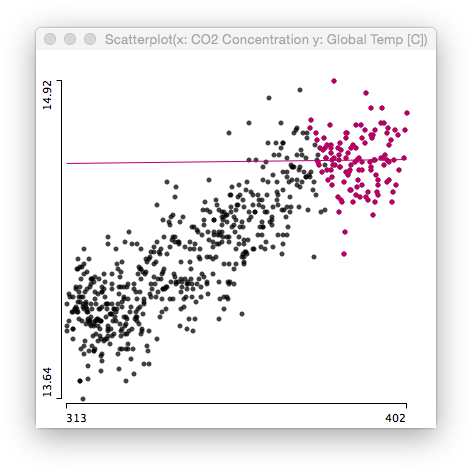 Again, there is no (linear) relationship whatsoever. Certainly CO2 is a greenhouse gas, and we all know how a greenhouse works.